The missing element from the net neutrality debate

The net neutrality debate should really boil down to one issue. Am I, as a consumer, getting what I paid for? The answer is NO!

Are we not paying for bandwidth?

Internet access is sold based on the speed of the connection. Not to pick on Time Warner but they are one of the opponents of net neutrality so they are fair game. A quick Google search finds their online rates:

From: http://www.timewarnercable.com/en/internet/internet-service-plans.html on 9/29/2014.

Time Warner Internet Price Sheet

As a consumer, I am asked to purchase Internet service based on the speed of that service. If you click a button to see more details they do have a small disclaimer at the bottom stating that I may not get as much bandwidth as I have paid for.

Time Warner Disclaimer about bandwidth

OK, so according to TWC, and every other ISP, I am paying for bandwidth that I might or might not actually get. Knowing how the Internet works, protocol limitations, etc. keeps me from being upset about this. Put simply, no ISP can control every factor that affects bandwidth.

I should be able to choose how I use my bandwidth

So, I have bandwidth. How do I want to use it? Perhaps I want to download something using all my available bandwidth.  Perhaps I want to browse the web while listening to some music online. Perhaps I don’t want to use any right now. Regardless, I paid for the bandwidth and should be able to use it all for whatever site I choose.

Looking at the terms of service, TWC doesn’t say they will limit the amount of bandwidth I use for any given site:

Time Warner Terms of Service

 So, why can’t I get my bandwidth?

If I want to stream movies all day long, I should be able to do that. I paid for the bandwidth. I did not exceed my limits. They are selling me something and not allowing me to use it. How would we feel about other industries that did the same thing?

  • $10/month for 200 texts but only one text a day to people that text a lot. 
  • $40 for two hours of babysitting but they only stay one hour if you use them regularly.
  • $80 to clean your house but they start skipping rooms if you hire them more than once a month. 

We would not stand for this from any other service, why do we take it from ISPs?

Give us what we pay for or change the way you sell it.

If you sell bandwidth, deliver bandwidth. If you don’t have the capacity to provide what your customers are paying for, increase your rates and improve your network. If you are worried about how the top 1% of customers using too much bandwidth, switch to a metered system like electricity or water. Do whatever it takes to actually deliver what people are paying for. Anything less should be, if it isn’t already, criminal.

The perfect but perhaps extreme solution for SPAM

As a decision maker in IT, I get dozens of unsolicited email messages a day. That may not sound like much but that is after some rather extensive anti-spam techniques:

  1. I never give out my email address except when I need to do business with someone.
  2. When people call and ask if they can email me a whitepaper I say NO.
  3. My spam filter blocks 95% of all email sent to my domain, and thus me.
  4. I unsubscribe from every email list I end up on.
  5. If a vendor does not have an unsubscribe function when they send me email I have a button I click which adds their domain to my blacklist and sends them a message that they have been blocked for not complying with the CAN-SPAM act. (I take particular joy in this … is that wrong?)

Still, I get SPAM. This frustrates me because I am in a position where I have to check email when it comes in. I get notified when a system is down via email so not checking is not wise. That means that the 20-30 unsolicited marketing messages that get through interrupt my work.

Enter the extreme SPAM filter process

Step 1: Who do I want mail from?

I want email from

  • everyone in my company
  • anyone I do business with
  • anyone in my contact list

I don’t want email from anyone else.

Is this reasonable? Is there any compelling business reason to accept unsolicited email from everyone? In my position, I am not looking for new customers so blocking email shouldn’t affect my ability to do my job. The amount of time that is spent deleting unwanted email far exceeds any benefit I get from it. It just seems rude to ruthlessly block the world but then again, they are interrupting my day without my consent. I would love to know everyone else’s thoughts on this.

Step 2: Setting up the filter

Outlook Safe Sender ListUsing Outlook 2013 I can easily set this up.

In Outlook, on the Home Tab, select Junk –> Junk Email Options.

Click the Safe Sender Tab

Add every domain you know you want to receive mail from. Frankly, this will take a while. You have to add all your domains, all the domains your devices send mail from, and all the domains of the vendors your work with. I spent some time sorting through my saved email to come up with this list. I tend to whitelist domains instead of users.

I recommend checking Also Trust Email from my Contacts and Automatically Add People I Email to the Safe Sender List.

Step 3: Applying the filter

Junk Email Options in Outlook 2013

Click on the Options tab and choose Safe List Only.

Now email from someone not white-listed in the Safe Sender Tab is sent to your junk folder.

For the next month, you are going to want to pay attention to your junk folder and continue to white-list people you need to get email from.

I also try to add vendors as contacts since I do business with them and that keeps me from having to add them to the white-list.

Step 4: Not missing something important

Looking through all the junk in your junk mail folder is annoying but you need to do this regularly until you are sure you are not missing messages.

When you find a message you need in the junk mail folder, right click it –> junk –> Not Junk. I then delete all the mail in my junk folder to make skimming it later less of a chore.

Go back to the Safe Sender List you created earlier. You will notice lots of individual email addresses like bob@domain.com. If you need email from everyone in that domain, edit the entry so that only the domain name is left. (@domain.com)

A new way of thinking about email

Junk folder in Outlook FavortiesI added the Junk folder to my favorites and moved in under the inbox. Because you have to check junk mail regularly you essentially have two inboxes. The first “Junk” inbox won’t make your phone beep, won’t make your computer beep, and won’t interrupt your day. Yes, you have to check it but over time that becomes less important.

The Inbox becomes a priority inbox from people you actually need to hear from and have your permission to interrupt your day.

Alternatives that are less extreme

I use this method because I only get notified of email that I have specifically approved. I find that I have to check my junk mail folder more often but since those messages don’t interrupt me, I am not losing productivity when they arrive.

You could accomplish something similar using rules and changing the notification settings.

Another option is to change how often Outlook checks for email. Setting it to 30 minutes guarantees you a half hour of productivity before someone derails your day.

Well, I hope this helps you stay productive. It has helped me but took a while to “fine tune.”

How to clean up Active Directory: Step 2 – delete Distributed Link Tracking objects

Continued from How to clean up Active Directory: Step 1 – old computer objects

I found tens of thousands of unused records in AD left over from the Windows 2000/2003 days. In fact, almost 80% of my AD Database consisted of records that served no purpose.

If you AD Domain has been around since the Windows 2000 days, you need to check this.

Windows 2000 used to store records in AD about file locations on NTFS volumes. In my domain that meant tens of thousands of records. In a child domain we found hundreds of thousands of records. This feature has been disabled since Windows 2008 so if your domain is Windows 2008 or higher, these records are trash.

Finding FileLink objectsPath to FileLink

Open AD Users and Computers –> Expand you domain –> System –> FileLinks

This is a good time to make a backup of your AD Database and verifying you know how to restore it. 

Look in the ObjectMoveTable and VolumeTable folders. If you see any records there, you can delete them.

Deleting FileLink records

You can delete any object under the ObjectMoveTable and VolumeTable folders. I did not delete the folders.

Microsoft has a script which is supposed to delete them but I was never able to get it to work. I ended up deleting the items one page at a time using AD Users & Computers. This took a little time but ended up being faster than fixing the script.

If you are a script guru it might be worth your time to write something but since this is a “Do One Time” task, I didn’t see the value. I just drank some coffee, clicked select all, delete, sip, repeat.

How to clean up Active Directory: Step 1 – Old Computer Objects

Keeping Active Directory clean and organized is important. It doesn’t take long for hundreds of unused objects or accounts to accumulate which leads to security problems and management nightmares. Auditors seem to have a special hatred for stale objects in Active Directory so keeping everything neat and tidy is a necessity.

Computer Accounts

When you join a computer to the domain, a computer account is created in AD. When you retire the computer it is best to remove it from AD. Many times IT departments forget to do this. Over time AD can easily contain hundreds of unused computer objects.

Getting rid of unused computer objects

Computer objects are easy to clean up. Every Windows computer has a domain account and password. Nobody ever sees the password but the computer knows it. Windows computers change their password every 30 days.

Unused computer account are those that have passwords that have not changed in more than 30 days.

If you want to know more about computer accounts and passwords read Microsoft’s Machine Account Password Process blog post.

Using a PowerShell script we can easily find unused computer accounts.

$lastSetdate = [DateTime]::Now - [TimeSpan]::Parse("200")

Get-ADComputer -Filter {PasswordLastSet -le $lastSetdate} -Properties passwordLastSet -ResultSetSize $null | FL

This script finds any computer that has not changed it’s password in the last 200 days. That means the password should have been reset 170 days ago. Change the 200 to whatever value you think is appropriate but I can’t think of a reason to use a value less than 60.

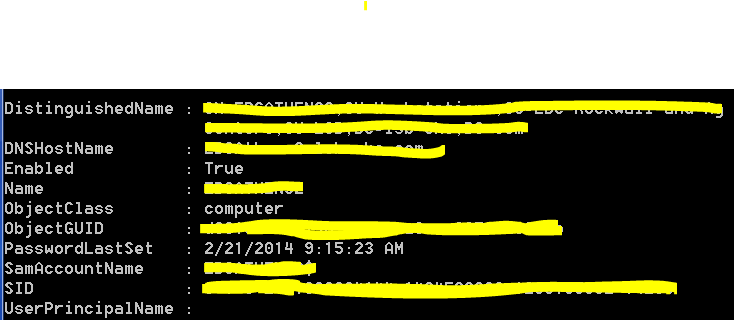
Computer Object

Notice the PasswordLastSet field. This computer has not been used in over six months.

Remember that some computers don’t get used very often. Perhaps there is a computer in the conference room, a test server that is off most of the time, or some other rarely used computer. Those devices could easily go a long time without being used and thus have very old passwords. You probably don’t want to delete those.

What happens if you delete a computer account and need it?

If you delete a computer account and then find the computer in a store room, you will have to rejoin it to the domain. That is a simple process as long as you know the local administrator’s password.

Deleting computer accounts … the slow way.

Before you delete computer accounts you should verify that everything the script finds is unused. It might be best to simply open Active Directory Users and Computers, find the offending accounts, and delete them one at a time as you validate they are no longer in use. This is the cautions approach.

Deleting computer accounts … the fast way.

Once you are positive the script is returning computer accounts that you no longer need, you can modify the script to automatically delete them.

Be careful! Being careless could bring your network down. Verify the script is only returning items you want to delete. If in doubt STOP HERE.

$lastSetdate = [DateTime]::Now - [TimeSpan]::Parse("200")

Get-ADComputer -Filter {PasswordLastSet -le $lastSetdate} -Properties passwordLastSet -ResultSetSize $null | Remove-ADComputer

If you still have the same PowerShell window open you do not need to execute the first line again.

Notice the second line now ends with “Remove-ADComputer.” Hit enter and a few seconds later, all your old unused computer accounts are gone.

Cleaning up AD Computer Objects is simple and should be done regularly. Hopefully this makes the process simple for you.

Next: Clean up AD: Step 2!

Three reasons why most IT projects fail (to meet expectations.)

There are hundreds of factors that can affect the outcome of any IT project. After years of managing all types of projects I have come to the conclusion that failure is often due to a lack of balance between three competing forces.

  • How fast you try to finish the project.
  • How frugal (or cheap) you are being.
  • How much you want the system to do.

There are many variations on the three legged stool analogy but they all state that you cannot have all three “legs.” I don’t agree. In fact, this type of thinking is dangerous. It only deals in extremes.

With so many things to go wrong, it is hard to get it right.

With so many things to go wrong, it is hard to get it right.

Although it is true you cannot build a highly complex system in days for a dime, you can build a system that has reasonable functionality in a reasonable time on a reasonable budget. The minute you move one of those factors closer to the extreme, the more likely you are to have a failed project.

So what is reasonable?

Reasonable is subjective and changes with each project. There is no magic formula to figure out what is reasonable. Each project does tend to have one “set in stone” factor.

  • If I need to replace my routers because they are old, and I don’t need any new functionality, then I know for sure what my functional requirements are. Now I only have to find a reasonable timeline and budget.
  • If I need to replace a CRM system with something new and unknown, I can set an upper and lower budget for the project and then keep the timeline and functional requirements within that budget.
  • If a product, like Windows XP, is being retired and must be replaced, I have a firm timeline. I only need to find the right balance between cost and functionality.

In most cases you only have to balance two factors, not all three.

Finding balance

This is not a joke: If everyone is a little unhappy, you have probably done well. Balance is about finding the middle ground which means someone will be disappointed. The budget conscious will feel like it was slightly more expensive than they wanted. The time conscious will feel it took too long. The rest will feel like some “nice to have” features are missing. Although this sounds bad, it is really project nirvana.

If one group is really happy, you focused too much on them. You gave them too much which throws the project out of balance. You have all the killer features but blew the budget or timeline.

Balancing a moving target

The most complicated projects I have worked on are software implementations like CRM or ERP. They always have an incomplete list of functional requirements. They always have a budget and timeline based on estimates from a vendor with an unclear understanding of the unclear requirements. The entire project is based on nothing but guesses which is why they often fail to meet expectations. The requirements always grow, the budget always grows, and the timeline always grows yet both the vendor and customer blame each other for the overage.

For projects like this, you must have (or be) a project manager that keeps all three factors in everyone’s mind at all times. You can’t add features without adding time and budget. You can’t set a deadline in stone unless you also freeze your requirements.

Who owns the leg

Just to make things more difficult, each leg of the stool, or factor, is generally managed by different groups. A senior manager or executive may be in charge of the budget while the IT team might be in charge of the timeline while some department head may be in charge of the functional requirements. They each look almost exclusively at their leg of the stool and say “My leg is the wrong length, fix it!” They don’t always care about the other legs and that means you have to balance requirements by getting three or more groups to understand each other’s needs. The project manager may need a degree in counseling to get some groups to work well with each other. If you can’t get all the groups to work together, the project will almost certainly fail to meet expectations.

Think balance, every day

You have to start a project in a balanced state. You have to consider how every decision you make affects the balance of the project. You have to communicate how each decision affects the project balance. If you end with a reasonable balance between cost, timeline, and functionality you hit a very small moving target. It feels like nothing less than a miracle.

Office 365: How long does an outage need to last to be an outage?

I was working on a SharePoint site in Office 365 recently when the site became unresponsive. <Click> count to 10 <click again> count to 10. The site was so slow it was unusable. I dd the normal troubleshooting routine:

  • Is my computer performing well? Yes
  • Is my Internet connection congested? No
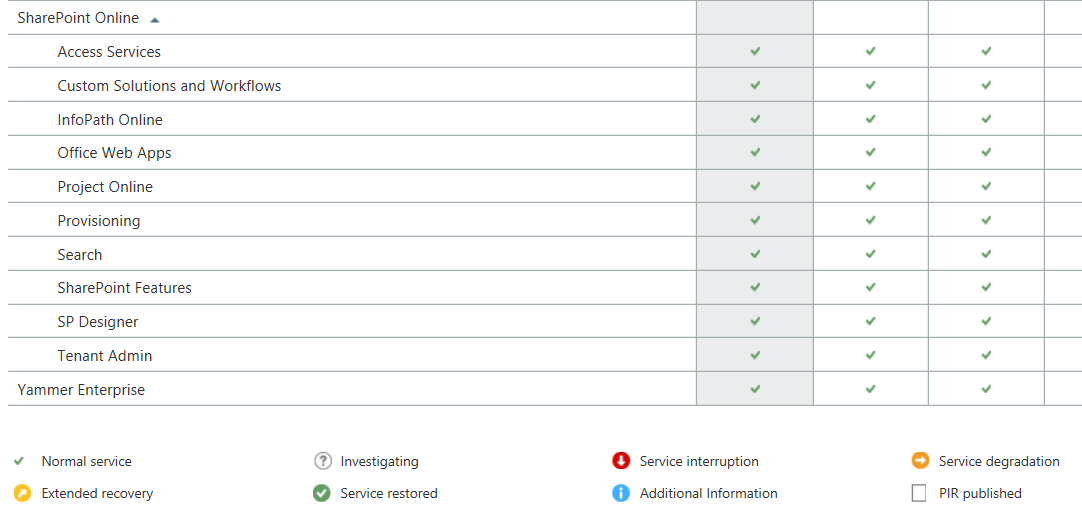
  • Does the Office 365 Service Dashboard say anything is wrong? No
If an outage isn't on the dashboard, is it an outage?

If an outage isn’t on the dashboard, is it an outage?

At this point I have no idea what is wrong but this is the beauty of Office 365 and other cloud applications, I don’t have to fix it.

I contacted Microsoft Support and went on with other tasks. After 20 minutes or so I tries SharePoint again and it was working fine. To be honest, I wasn’t really upset about the outage. It was aggravating but not the end of the world.

Then Microsoft Support called …

The support engineer was polite and helpful. Apparently there had been an outage and SharePoint was inaccessible for a period of time. I said that I had checked the Dashboard and it didn’t say anything about an outage.His response was …

Response to outage

So, an outage occurred that affected customers but it remains unreported because it wasn’t a big outage? That makes me start to think …

  • According to the Dashboard, Office 365 almost never has issue but how can I trust that now that I know they don’t report short outages?
  • If Microsoft does not acknowledge the outage, how can I make claims against my SLA if I need to?
  • How big does an outage have to be to be reported?

Mostly I am upset because I need honesty from my application providers. I need to know when something is wrong on their end so I can stop troubleshooting things on my end. By not telling me there is, or even may be, a problem they are wasting my time. This is something I will bring up with my Microsoft representative but I suspect nothing will come of it.

Before I buy another cloud application I am going to want to see their historical dashboard records and then I am going to search the web for outage reports. If I find under-reporting on the part of the vendor, I am going to pass on their services.

This post was updated 9/10/2014: Added the response from Microsoft.

More critical issues to consider when choosing browser based tools or applications

Browser based applications seem like a good idea. You deploy a server with an application and users simply use a web browser to access it. No installation, patching, or maintenance of the end user’s workstation is required. What could be more simple?

As I wrote previously, this isn’t entirely true. On my Windows machines, it is common for me to have apps that require different versions of Internet Explorer or FireFox. It is hard to manage PCs when one application requires IE9 and another requires IE10. Some work on FireFox but only new versions while other won’t work with anything news that something that was released two years ago.

Sadly, it is still the big names in the business causing most of this havoc.

I recently discovered that the transition from Windows 7 to Ubuntu Linux was easier than the transition from Windows 7 to Windows 8. I still believe that but I ran into new complications.

Adobe Flash is no longer supported under Linux. Java is no longer supported in Chrome on Linux and OS-X. Imagine what that will do to your management capabilities! The vSphere 5.5 web client requires a new version of Flash and thus cannot be managed via Linux. Most of my Dell servers have management cards requiring Java. They are difficult to manage under Linux. I don’t even want to talk about the complexities of using a browser to manage my Cisco gear. Put simply, Linux is awesome but incompatible with many of the web applications available today.

It’s getting so complicated I am tempted to run a bunch of terminal or Citrix servers with specific browser versions so that when a user launches an app, I can launch it in the correct browser and version. What a pain.

If you are a web developer, I beg you, please do not write code that requires a specific browser or version of Java, Flash, etc. The overlapping requirements quickly combine to make it impossible to use every web application we have from a single machine. This is a real problem.

In theory, HTML 5 will save the day but I suspect it will take a decade for people to convert legacy applications to it and by then something else will be the new thing which breaks our applications.

Think carefully about using browser based applications. If you have more than two, you may have to have multiple machines just to be able to use them.

Is Linux or Windows 8 easier to use?

I have been using the original Surface as my laptop since it was released. To mu surprise iy has worked out very well. All of my applications, including odd ones like NMAP, work great. The only thing I dislike is the lack of ports. One USB port makes working with external devices a pain. I have purchased USB adapters so I can connect to devices via serial ports. The one things I have not purchased and that kills me is a USB to Ethernet cable. There are times I cannot be plugged into a docking station and need an Ethernet port. All things considered though, the Surface is a great laptop.

The one thing I still struggle with is Windows 8. (Yes, I updated to Windows 8.1 but it is still a pain to work with.) I open a PDF and it goes into tiles mode. Switching between the desktop and tiles is an insane design at best. Running on the desktop only seems like trying to avoid the inevitable. I have really tried to get comfortable with Windows 8 but the UI is just bad. It is by far the worst UI ever designed simply because you basically are using to operating systems at once.

I needed a laptop with a bunch of ports so I took an abondoned Windows 8 laptop and loaded Ubuntu Linux. (It was harder to delete Windows than it was to load Linux.) To my great surprise the load went well. The laptop had a touch screen which Ubuntu detected. Everything just worked. Installing software and hardening the OS was simple for an IT guy. What amazed me though was the interface.

When I use Linux, I typically don’t even load the GUI. What can I say, I love text only CLI interfaces on Linux. (I hate the Cisco CLI though.)  This was the first time I loaded a GUI on Linux in years. Frankly, the GUI was stunning

In all fairness, the Windows 7 interface is probably easier to use because it is about the same as every other version of Windows going back to 98. I realized that the change from Windows 7 to Ubuntu was minimal while the change form Windows 7 to Windows 8 was gut wrenching.

I am considering doing some A/B testing with users. I believe that if I were to have one group use Ubuntu and another use Windows 8 I would find the Ubuntu crowed more efficient. I might concede that they would be equally proficient but for the cost savings Linux would bring, why not use Linux?

I won’t inflict anything on end user that I won’t inflict on myself. I decided to go rouge and use Ubuntu as my only work laptop.

  • Email: Evolution seems to be a fine Outlook replacement. It does everything I need. I don’t know if it will work with Office 365 or newer version of Exchange though. If it doesn’t work, I can live with email on my phone and OWA.
  • Web Browsing: Everything but Internet Explorer. If you have to have IE, Linux won’t work.
  • JAVA: I have yet to get websites that use JAVA to work on Chrome. I will eventually but that seems to be a pain. (Hints are welcome.)
  • Security Tools: NMAP, Wire.Shark, and all my other favorite tools work better on Ubuntu than Windows. I run these on Linux anyway.
  • Visio: I love Visio but DIA seems to work well enough for me to diagram everything I need to diagram.
  • Office: LibreOffice does everything I need. I have yet to try to load a bunch of my Office docs in Linux but I suspect they will work. If not, I am willing to convert them all over time. I don’t use Office much anyway. I would prefer to use the web apps in either Office 365 or Google Apps anyway.
  • RDP: Yep, I can remote control all my servers.
  • Putty: I can remote control everything else
  • Printing: Paper is dead. I never print. I’ll have to test it at some point though.
  • Patching: We use Dell’s KACE system for patching. It works on some flavors of Linux. I still need to test this. If it doesn’t work, I can use the built in patching engine to keep everything updated.
  • Encryption: You can encrypt the hard drive during installation making laptop theft less of an issue. Password management might be a pain but so is data loss.

I don’t know if I would throw Ubuntu into production but if Windows 9 isn’t significantly easier to use, it may be hard to justify the cost of Windows anymore.

Are you listening Microsoft?

One critical issue to consider before using a cloud or browser based application

I used to believe that browser based applications would significantly reduce the time and effort required to deploy and manage applications. I am almost ready to ask my vendors for a fat client, meaning one I have to install on every PC.

The ugly truth

I have been dealing with two products from Oracle. The first is JD Edwards and the Second is Hyperion Financial Management. They are both browser based meaning I don’t need to install any applications on the end user PCs. I just send them a link and they can use the application … except that they can’t.

Today is June 18th, 2014. Internet Explorer 11, Firefox 30, and Windows 8.1 are the most current versions available today. (Firefox ESR 24 is available as well.)

Here are the browsers supported by Oracle for one of the products:

Oracle Supported Browser Versions

You may have noticed Internet Explorer and Firefox are the only two browsers supported. You will also notice that Firefox won’t work without an add-on and even then won’t work in every module. So, to use this product, I have to use Internet Explorer 9 or earlier.

I also have PCs running Windows XP, 7, 8 , & 8.1. A little research shows that I am in trouble.

Windows and IE versions

  • Windows XP: IE 8 is supported! Maybe I’m glad I waited to upgrade?
  • Windows 7: IE 8 was installed out of the box but most users upgraded to IE 10. I will have to downgrade them all back to IE 9.
  • Windows 8 & 8.1: Can’t run anything less than IE 10. No Oracle products for you!

It get’s worse! Major version upgrades are now automatic.

Starting with IE 10, the browser will automatically upgrade major versions when they are released. So IE 10 users will automatically move to IE 11, 12, 13, etc. You can disable the feature through group policy but you also have to prevent the user from installing newer versions themselves. I am not against automatic browser upgrades but in this case it will break my business critical applications.

It get’s worse! Not all products have the same requirements.

This is only one of the systems I manage that have draconian browser requirements. Other Oracle applications have different browser requirements. Some won’t run on older browsers while others won’t run on newer. It is getting difficult to keep everyone on a browser version that will work. It would be less complicated to push out a client application than to manage this nightmare.

Shame on Oracle … and everyone else.

If you are going to write a web based application, keep it up to date. You are essentially writing an application that shares the same “display application” as other applications and staying years behind the update curve causes problems for everyone. I understand this means we might have to upgrade the Oracle applications themselves but that isn’t even an option right now. Keep current or write your own client. That should be a law.

Cloud applications tend to be the opposite.

Most cloud applications are browser based. The difference is, they are updating their application all the time. Most cloud applications like Salesforce, Office 365, or Dropbox support the current and one older broswer version. Older than that and they won’t promise their application will work. I would much rather work at keeping my system up to date than keeping them years behind. They also tend to work with many browsers which makes life better.

So, browser based applications are NOT the  solution I had hoped for. I would spend less time supporting them if I simply had to install an application.

IT Security Tip: When not to be helpful

If you manage IT and have a phone you probably get dozens of calls a day from sales people and researchers. Most of them are very good at keeping you on the phone.

It is in our nature to want to help people

The calls always start with a very chipper person introducing themselves and their company. Researchers often add that they are not trying to sell anything. This is followed up by a question like “What are you using for storage?” It is difficult not to answer. We want to be helpful. Why shouldn’t I answer?

Giving out information about your network is a security risk

I suspect I could call 10 IT people and get critical configuration information from five of them by pretending to be a salesperson, researcher, or peer.

  • What firewall are you using?
  • What VPN solution do you have?
  • Do you have any issues with it you would like to see fixed?
  • Do you struggle with patch management?
  • What log management system are you using?

All of this information can be used to design an attack against your company.

Ask yourself who needs to know this information?

Nobody outside your organization needs to know how your network is configured.

What happens if the vendor or researcher gets hacked?

If I were a hacker, I would want to get hold of any vendor’s CRM database. That could contain a significant amount of information about a potential target’s networks. How secure is the data you provide to vendors? Why take the risk?

What to say when someone calls and asks “What product do you use for xyz?”

I am not allowed to provide that information over the phone. Repeat that as often as needed. You can add that you are constrained by policy and cannot provide them any information about the network, software, or anything else.

Bonus tip: How to get a vendor off the phone

Unless this is a vendor you want to talk to, simply tell them you are not soliciting new vendors at this time. Don’t tell them you do or do not have a solution, that is a security risk. Just tell them you are not looking for new vendors, thank them, and hang up.

I even added a short blurb at the end of my voice mail message that says “If you are a vendor, we are not soliciting new vendors at this time. Messages will not be returned.” I am polite but it is a way of letting them know I don’t want to keep getting calls. If I am looking for new vendors I might say “If you are a vendor for XYZ products, please leave a message. We are not soliciting other vendors at this time.”

Some people think that is rude. I find the decrease in SPAM voice-mail a relief.

Bonus bonus tip: Decrease unsolicited email messages

I must gOutlook Junk Buttonet 20 email messages a day from vendors asking me to meet with them to discuss how they can save me money, time, etc. I save more time by not reading their email. (Yes, I am a little bitter at the massive amount of junk mail I have to wade through.)

Outlook has a feature which many people overlook. Simply click on the Junk button and select, “Block Sender.” You will never get an email from that person again.

If you want a more extreme way of blocking junk, you can try something I have been experimenting with.


Updated 09/23/2014 for grammatical errors.