Office 365: How long does an outage need to last to be an outage?

I was working on a SharePoint site in Office 365 recently when the site became unresponsive. <Click> count to 10 <click again> count to 10. The site was so slow it was unusable. I dd the normal troubleshooting routine:

  • Is my computer performing well? Yes
  • Is my Internet connection congested? No
  • Does the Office 365 Service Dashboard say anything is wrong? No
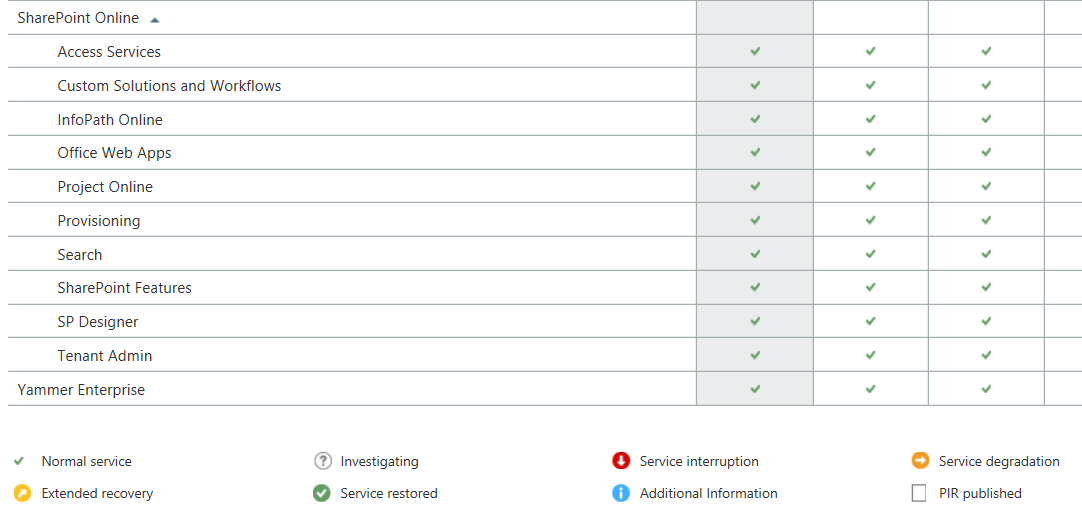
If an outage isn't on the dashboard, is it an outage?

If an outage isn’t on the dashboard, is it an outage?

At this point I have no idea what is wrong but this is the beauty of Office 365 and other cloud applications, I don’t have to fix it.

I contacted Microsoft Support and went on with other tasks. After 20 minutes or so I tries SharePoint again and it was working fine. To be honest, I wasn’t really upset about the outage. It was aggravating but not the end of the world.

Then Microsoft Support called …

The support engineer was polite and helpful. Apparently there had been an outage and SharePoint was inaccessible for a period of time. I said that I had checked the Dashboard and it didn’t say anything about an outage.His response was …

Response to outage

So, an outage occurred that affected customers but it remains unreported because it wasn’t a big outage? That makes me start to think …

  • According to the Dashboard, Office 365 almost never has issue but how can I trust that now that I know they don’t report short outages?
  • If Microsoft does not acknowledge the outage, how can I make claims against my SLA if I need to?
  • How big does an outage have to be to be reported?

Mostly I am upset because I need honesty from my application providers. I need to know when something is wrong on their end so I can stop troubleshooting things on my end. By not telling me there is, or even may be, a problem they are wasting my time. This is something I will bring up with my Microsoft representative but I suspect nothing will come of it.

Before I buy another cloud application I am going to want to see their historical dashboard records and then I am going to search the web for outage reports. If I find under-reporting on the part of the vendor, I am going to pass on their services.

This post was updated 9/10/2014: Added the response from Microsoft.

VMWare Site Recovery Manager reprotect step fails with EqualLogic PS storage

I am using VMWare Site Recovery Manager (SRM) at two locations. One is my primary data center (PDC) and one is my disaster recover (DR) data center.  I have two EqualLogic PS 4110 arrays at each location. The EqualLogic arrays have many volumes which replicate on a schedule to the DR site.

In all but one test, SRM failed during the reprotect step.

Error on reprotect:

Failed to reverse replication for device ‘iqn.2001-05.com.equall-ogic:0-af1ff6-xxxxxxxxx-xxxxxxxxx-xxxxxx-xxxx.1’.

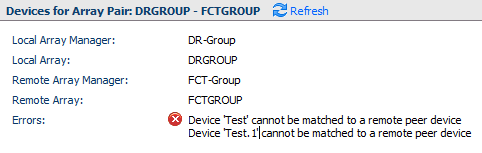
I would also see problems with the array pair in the SRM Dashboard:

SRM Broken Replication

SRM Error: Device Test cannot be matched to a remote peer device

This all makes sense once you understand what went wrong.

Understand the limits of the Storage Replication Adapter (SRA)

The SRA acts as a middle man between SRM and the EqualLogic Array. It does not do a good job of producing an error a human can understand or even find. What you are left with is the vague errors you see in SRM which are not helpful. They key is in the message “Device ‘XXXX’ cannot be matched to a remote peer device.

The SRA will only work with one storage pool. I had two storage pools at PDC and one at DR.  It wasn’t the mismatch that mattered, it was the fact that I had two pools. I could have had two pools at both sites and received the same error.

How it fails

I created a volume on Pool B (The second pool) at PDC and replicated it to DR. When I clicked reprotect in SRM, the SRA tried to find the volume on Pool A. The volume didn’t exist, because it was in Pool B, and this SRM barfed the dreaded “Failed to reverse replication for device ‘iqn.2001-05.com.equall-ogic:0-af1ff6-xxxxxxxxx-xxxxxxxxx-xxxxxx-xxxx.1′” error.

You can however reprotect any VM on a volume from Pool A without error.

How to fix it

In my case the solution was simple. I merged the two pools. My next test of SRM worked. The other option is to only protect VMs in Pool A.

This is an annoying issue which I hope Dell fixes in future versions of the SRA. If I were to buy another array I would be unable to use SRM to protect my VMs because I would have multiple pools.  

If you are considering buying a Dell EqualLogic array, consider this limitation carefully if you are going to use SRM. Your ability to grow over time will be limited by the SRAs inability to deal with multiple pools.

VMWare vSphere won’t launch console with Chrome browser

After clearing my browser settings, I couldn’t launch remote consoles using the “Launch Console” link on the vSphere 5.5 web client. Needless to say I was VERY frustrated. I couldn’t find anything on Google and I was dealing with other problems and simply didn’t need yet another broken system.

I forgot about popup blocker

On the right side of the address bar, if you see an image like this, popups are being blocked.

popup blocker indication

Simply click the icon and allow popups from your vSphere server. More information on managing popups is available from Google: https://support.google.com/chrome/answer/95472?hl=en

My forehead is still sore from slamming it into the desk when I realized what was happening. I hope this prevents that for you.