The missing element from the net neutrality debate

The net neutrality debate should really boil down to one issue. Am I, as a consumer, getting what I paid for? The answer is NO!

Are we not paying for bandwidth?

Internet access is sold based on the speed of the connection. Not to pick on Time Warner but they are one of the opponents of net neutrality so they are fair game. A quick Google search finds their online rates:

From: http://www.timewarnercable.com/en/internet/internet-service-plans.html on 9/29/2014.

Time Warner Internet Price Sheet

As a consumer, I am asked to purchase Internet service based on the speed of that service. If you click a button to see more details they do have a small disclaimer at the bottom stating that I may not get as much bandwidth as I have paid for.

Time Warner Disclaimer about bandwidth

OK, so according to TWC, and every other ISP, I am paying for bandwidth that I might or might not actually get. Knowing how the Internet works, protocol limitations, etc. keeps me from being upset about this. Put simply, no ISP can control every factor that affects bandwidth.

I should be able to choose how I use my bandwidth

So, I have bandwidth. How do I want to use it? Perhaps I want to download something using all my available bandwidth.  Perhaps I want to browse the web while listening to some music online. Perhaps I don’t want to use any right now. Regardless, I paid for the bandwidth and should be able to use it all for whatever site I choose.

Looking at the terms of service, TWC doesn’t say they will limit the amount of bandwidth I use for any given site:

Time Warner Terms of Service

 So, why can’t I get my bandwidth?

If I want to stream movies all day long, I should be able to do that. I paid for the bandwidth. I did not exceed my limits. They are selling me something and not allowing me to use it. How would we feel about other industries that did the same thing?

  • $10/month for 200 texts but only one text a day to people that text a lot. 
  • $40 for two hours of babysitting but they only stay one hour if you use them regularly.
  • $80 to clean your house but they start skipping rooms if you hire them more than once a month. 

We would not stand for this from any other service, why do we take it from ISPs?

Give us what we pay for or change the way you sell it.

If you sell bandwidth, deliver bandwidth. If you don’t have the capacity to provide what your customers are paying for, increase your rates and improve your network. If you are worried about how the top 1% of customers using too much bandwidth, switch to a metered system like electricity or water. Do whatever it takes to actually deliver what people are paying for. Anything less should be, if it isn’t already, criminal.
Office 365: How long does an outage need to last to be an outage?

I was working on a SharePoint site in Office 365 recently when the site became unresponsive. <Click> count to 10 <click again> count to 10. The site was so slow it was unusable. I dd the normal troubleshooting routine:

  • Is my computer performing well? Yes
  • Is my Internet connection congested? No
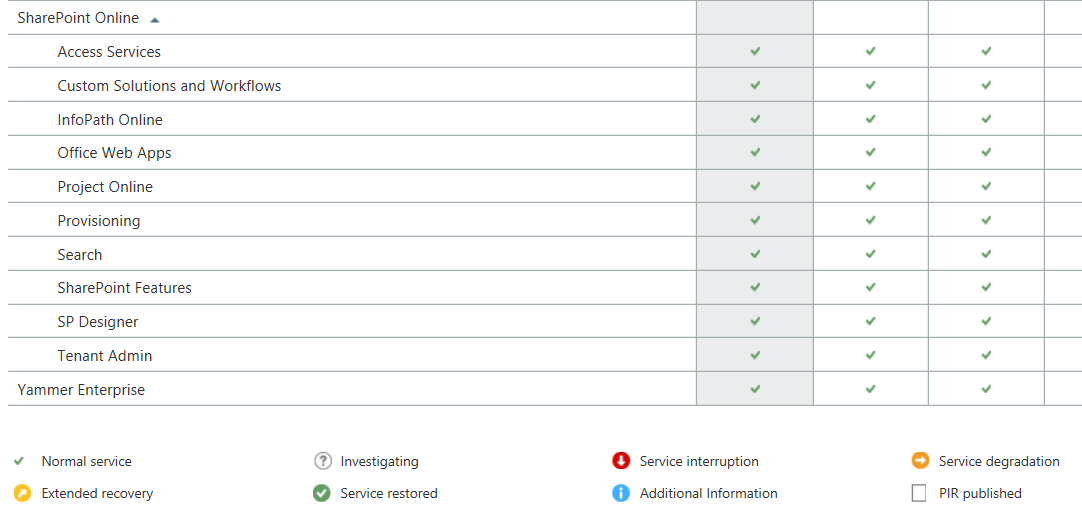
  • Does the Office 365 Service Dashboard say anything is wrong? No
If an outage isn't on the dashboard, is it an outage?

If an outage isn’t on the dashboard, is it an outage?

At this point I have no idea what is wrong but this is the beauty of Office 365 and other cloud applications, I don’t have to fix it.

I contacted Microsoft Support and went on with other tasks. After 20 minutes or so I tries SharePoint again and it was working fine. To be honest, I wasn’t really upset about the outage. It was aggravating but not the end of the world.

Then Microsoft Support called …

The support engineer was polite and helpful. Apparently there had been an outage and SharePoint was inaccessible for a period of time. I said that I had checked the Dashboard and it didn’t say anything about an outage.His response was …

Response to outage

So, an outage occurred that affected customers but it remains unreported because it wasn’t a big outage? That makes me start to think …

  • According to the Dashboard, Office 365 almost never has issue but how can I trust that now that I know they don’t report short outages?
  • If Microsoft does not acknowledge the outage, how can I make claims against my SLA if I need to?
  • How big does an outage have to be to be reported?

Mostly I am upset because I need honesty from my application providers. I need to know when something is wrong on their end so I can stop troubleshooting things on my end. By not telling me there is, or even may be, a problem they are wasting my time. This is something I will bring up with my Microsoft representative but I suspect nothing will come of it.

Before I buy another cloud application I am going to want to see their historical dashboard records and then I am going to search the web for outage reports. If I find under-reporting on the part of the vendor, I am going to pass on their services.

This post was updated 9/10/2014: Added the response from Microsoft.

Microsoft Volume Licensing is NOT a discount program

Microsoft Logo

You would think Microsoft Volume Licensing allows businesses to purchase large quantities of software at a discount. Put simply, it doesn’t.

OEM software is far less expensive

When I order a computer, I can get a full copy of Microsoft Office for about $200. It is a retail copy meaning my usage rights are fairly restricted. I can’t move that copy to another computer. I can’t upgrade it when a new version comes out without spending a ton of money. If all I want is a copy of Microsoft Office to use until my computer dies, it will cost me $200.

Or, I can buy a copy through Microsoft Volume Licensing. I can choose between Open, Select, or Enterprise agreements. Depending on the price tier you are in and the volume you buy in you might pay as little as $400 for a copy of Microsoft Office through volume licensing. In fairness I get more usage rights with a volume license. I can move the license between computers for example which is very helpful. Is it worth paying twice as much for the convenience of moving a copy of Office from one computer to the next?

I have run the numbers every way I know how and the honest truth is there isn’t a way to justify the extra cost of buying through Volume Licensing.

Windows is getting less expensive, if you are an OEM

Although still in the rumor state, it appears Microsoft will be discounting Windows 70% to compete with Android and Apple. That would make me happy if that discount was available through Volume Licensing which to date it is not.

Once again, the most expensive way I can purchase Windows is through Volume Licensing.

Windows may end up being free

Another rumor is that Microsoft is considering making Windows free. I actually think this is a good idea but will it be free to enterprise customers? If Microsoft continues the trend of marking up software to volume customers, I suspect I will pay a hefty sum for an otherwise free product.

But the licenses are different!?!?

I can hear Microsoft salespeople screaming about how the volume license has different use rights than OEM and retail licenses and they are right. Volume licenses allow for much more freedom than OEM or retail licenses. What they fail to realize is that the math just isn’t adding up. With the cost of hardware going down every year, it is often less expensive to simply buy someone a new laptop instead of paying for upgrade rights on software.

Oh, and there is the audit thing

Read the Open, Select, and Enterprise agreement carefully and you will find that as the discounts increase, so do Microsoft’s rights to audit your software usage. If you sign an Enterprise agreement for example, Microsoft has the right to conduct an onsite audit without notice.

I would never knowingly deploy software I had not purchased but that doesn’t mean I want to volunteer for more vigorous audits. The “discount” I get would likely not pay for my time to conduct the audit.

Buying OEM is the least expensive and most painful way to get licensing from Microsoft

I am really struggling with this concept. I am tired of paying more for products using volume licensing but it is hard to order everything you need when you order a computer. It is also getting harder to buy things retail since many products are moving to subscription pricing. Regardless, it is hard for me to pay volume pricing for the limited benefit I get from it.

Is Active Directory still relevant?

Windows 2000 started Microsoft’s Golden Age. With Active Directory and Group Policy you could control the settings on every PC and server on your network from a single screen.  If you need to tell every computer where to download Window’s Updates you checked a box. If you needed to turn off a Windows feature you checked a box. As long as every PC in your domain was a Windows PC, management was a breeze.

BYOD forced diversity into the network

Fast forward to 2007. Two things changed IT forever:

  1. Microsoft introduced Windows Vista
  2. Apple introduced the iPhone

Within a few years, IT departments lost control of devices selection and PC sales started declining for the first time ever.

When a CEO walks into the IT department with an iOS or Android device and says “Make it work,” you make it work. The vast majority of tablets sold today run iOS or Android which fall outside the control of Active Directory. It is reasonable to assume device diversity will continue to expand when you consider that Chromebooks now account for 20% of “PCs” sold to educational institutions and Android Laptops have been announced.

You still have to control mobile devices

If you connect a mobile device to your corporate network, regardless of what it is, you should have some control over it. For example, most phones can send and receive corporate email. Email is protected by a password on PCs but not necessarily on a phone. Companies should enforce a password policy on any device that can send or receive company email.

This requires Mobile Device Management (MDM) software. Even if the MDM solution integrates into Active Directory, this is another layer of compelxity for the IT department to manage.  It is one more thing to fix,  configure, and require policies, oversight, auditing, disaster recovery, etc.

Can MDM replace Active Directory?

Some MDM systems work on Windows laptops as well as phones and tablets. If it can be installed on a laptop, it can be installed on a desktop. What if we pushed policies to computers using MDM instead of Active Directory (AD)?

To be honest, I don’t think MDM technology is able to replace AD …. yet … but it may not be long before it can. This has caused me to be very cautious about selecting products that require AD.

It is hard to imagine a world without some form of centralized user account database like AD but with cloud services the use of AD may become problematic.

The effect of the cloud on AD

Assuming you can handle the complexity of migration, you can integrate your existing AD infrastructure into Office 365. You can also sync AD with Google Apps via Directory Sync. Most other cloud applications have their own user account database which does not sync with AD.

This creates another problem. As we choose cloud applications we have to decide if we want Single Sign On (SSO) via AD integration or to force end users to have multiple user account and passwords. Users will have a hard time remembering all their accounts and IT will have to go to multiple sites to manage accounts. Neither solution is ideal.

Microsoft is building a MDM solution

Microsoft is building an MDM solution that is integrated into Active Directory and will manage iOS and Android devices. In many ways that sounds like the perfect solution and it may be. Microsoft frustrated me in the early days of the cloud by creating products that only worked on Windows or Internet Explorer. I understand they were trying to protect Windows and Office but it put them years in cloud and mobile development.

Microsoft’s early lack of vision in the cloud and mobile market makes me caution about using their products on non-Microsoft devices. I can envision a world where their MDM solution is great on Windows Phone but lacks features for Android and iOS. I am worried about being tied to a vendor that could easily use one product to try to force me to use another. Conversely, management of the network would be much less cumbersome if I can use one console for MDM and User Management.

One system to manage them all

At this time, I don’t see any alternative to using MDM to manage mobile devices and AD to manage users.

If Microsoft makes it easy and cost effective to manage mobile devices and users with AD they may be the best user management platform moving forward.

On the other hand, if their management tools and interfaces continue to be Windows-centric, their relevance is going to continue to decline to the point where third party management solutions will be a better choice.

It is hard for me to imagine a world without Active Directory but if Microsoft doesn’t adapt all of it’s products to work well with other products I can see a time in the next 5-10 years where Active Directory will be considered legacy technology.